Key-agent risk: what happens to your AI setup when someone leaves
First published on LinkedIn on 9 November 2026.
Key-agent risk is key-person risk that has moved into your AI. As teams build skills, templates and connections that teach AI how their business works, that know-how can walk out the door with a staff member, disappear when a vendor has a bad day, or sit in a contractor's account. Most of the fix is people and process, not technology.
A few weeks ago a director at a construction firm we work with asked me a question that has played on my mind since: what stops someone walking out the door with this? By "this" he meant the AI setup his team had been building, the instructions, templates and connections that let it do the work the way they do it.
It's a reasonable question, but most businesses aren't there yet, or haven't had to consider it. For the last couple of years AI at work has mostly meant individuals using a chat tool. That's changing quickly. Teams are now writing skills (saved instructions that teach the AI a task), connecting it to email, files and finance systems, and setting up who can use what by role. Done well, the AI ends up holding a working copy of how the business operates, which is exactly what makes it useful and exactly why the director's question matters.
What is key-agent risk?
Every business owner understands key-person risk. If the one person who knows how the pricing works leaves, you have a problem, and most of us manage it with documentation, cross-training and, to be honest, a bit of hope.
Key-agent risk is the same problem sitting somewhere new. When the know-how lives in an AI setup, it can leave in three ways. A person can go and take it with them. The vendor can change things, retire a model or simply go down for a while. Or the person who built it, often a contractor, can move on while holding the only working copy.
The first of those is a security problem and the other two are continuity problems. From what I'm seeing with clients, most businesses haven't started looking at any of them.
Why people and process come first
We talk about people, process and technology in that order for a reason, and it applies here too. Most of this risk isn't new. It's the same gaps businesses have always had: unclear ownership, loose access, and an offboarding checklist nobody has updated in years.
What AI does is add reach, depth and speed to whatever is already there. A well-run process gets faster and better. A loose one now leaks further and faster, and it's harder to spot when it does. If the governance and the approach are poor, the technology amplifies that as well.
So most of what follows is about people and process. The technology matters, but it's honestly the smaller part of the job.
What has changed in AI security?
A year ago a lot of the advice about AI security was about stopping attacks. That has shifted. In December 2025 the UK's National Cyber Security Centre said prompt injection, where hidden instructions in an email or web page hijack an AI, may never be fully fixed, and it warned people off any vendor claiming they can stop it.
So the focus now is on reach. If you can't guarantee nothing bad gets in, you make sure the AI can't reach much when it does, and you notice when that changes. Simon Willison, one of the clearest writers on this, describes the dangerous mix as private data, untrusted content and a way to send things out. The big AI data flaws of the past 18 months, in Microsoft Copilot, Salesforce and GitHub, all fit that pattern.
The other change is that skills and connectors have become a supply chain. In September 2025 an email connector for AI tools turned up on a public software registry that was quietly copying the emails it sent to an outside address. Anyone who had installed it kept leaking until they took it out.
For an SME this shows up somewhere very ordinary. Who set up that connector, and what can it see? Is the skill someone wrote for the finance team holding client pricing that the rest of the business can now reach? None of that is an exotic attack. It's configuration, and configuration drifts over time unless someone is watching it.
Prompts are not controls
This is why we keep telling clients that prompts are not controls. Telling an AI "don't share this" is a request, not a rule. The controls that actually hold are the ordinary ones: who has access, what's connected, and someone checking it stays that way.
OWASP, which publishes the best-known list of risks in AI applications, says much the same. An AI's instructions shouldn't hold sensitive information, and they shouldn't be relied on to decide who sees what. The rule we use with clients is simple: skills hold the method, not the data. The data stays where it lives, behind the same access rules as everything else.
What happens to your AI when someone leaves?
The exit checklist in most businesses covers the laptop, the phone and the swipe card. It doesn't usually cover the AI note-taker on a personal account, the chat history, or the connection that lets a tool keep reading someone's mailbox after they've gone.
A case filed in a US federal court in October 2026 shows how this can play out. An insurance brokerage alleges a departing broker used an AI note-taker on a personal account to capture client meetings for about four months, and that its exit checklist only covered hardware. Nothing has been decided yet, but the shape will be familiar to anyone who has run an offboarding.
Shadow AI
The bigger version of this is Shadow AI: staff using AI tools the business hasn't approved and can't see, usually on personal accounts. It's rarely malicious. Most people are just trying to get their work done with the tools they know, and the approved option is often missing or not as good.
What makes it hard is that the business usually can't see it. Client notes, pricing logic and the prompts that make someone good at their job can all end up sitting in accounts the business doesn't control. When that person leaves it all goes with them, and often nobody notices until the work stops.
Banning it doesn't really work, because it mostly pushes the use further out of sight. What does work is giving people approved tools that are good enough to actually use, being clear about what can and can't go into them, and making sure the exit checklist asks the question.
What happens when the AI goes down, or changes?
Continuity is the part I hear almost nobody talking about yet, and I think that will change fairly quickly.
AI outages happen, although they're usually short. Anthropic had about two hours of elevated errors across Claude in July 2026. Later that month OpenAI had two outages in one morning, the second caused by its own automation re-applying the faulty change. Two hours is fine if AI is drafting your emails. It's a different conversation if it runs your quoting or your rosters.
Models also retire on a schedule. Anthropic gives at least 60 days' notice before retiring one, which is reasonable, but it means a skill tuned to one model needs maintaining rather than being built once and forgotten.
Then there's the builder. If a contractor set up your AI and the configuration lives in their account, you've still got key-person risk, it's just moved somewhere less obvious.
The regulators have started to notice. In October 2026 the Reserve Bank and the FMA told New Zealand's financial sector to plan for AI provider outages and model failure and to test their manual workarounds. That was aimed at banks and insurers rather than SMEs. But banks and insurers have suppliers, and I'd expect those suppliers to start getting the same questions down the track.
Five questions to ask your leadership team
None of this needs a big programme to get started. These are the questions I'd put to a leadership team this month.
- Where does AI do real work in our business, and who owns each piece of it?
- What can each skill and connector reach, and when did someone last check?
- If a key person left tomorrow, what AI work, accounts or notes would go with them?
- If our main AI tool was down for a day, what would we do at 8am?
- Do we own a copy of our AI setup, or does it live in someone else's account?
If you can answer all five with confidence, you're ahead of most. If you can't, that's normal, and it's a lot easier to sort out now than after something has gone wrong.
There's also one thing worth stopping: treating the AI policy as the control. A policy says what should happen, but it can't tell you whether it is happening.
A layered model for managing key-agent risk
At AI New Zealand we're building this with our clients now. Every business is a bit different, but more of it is common than you'd expect: the same layers, the same weak spots, and the same questions when someone leaves. The diagram below is the simple version of the model we use.
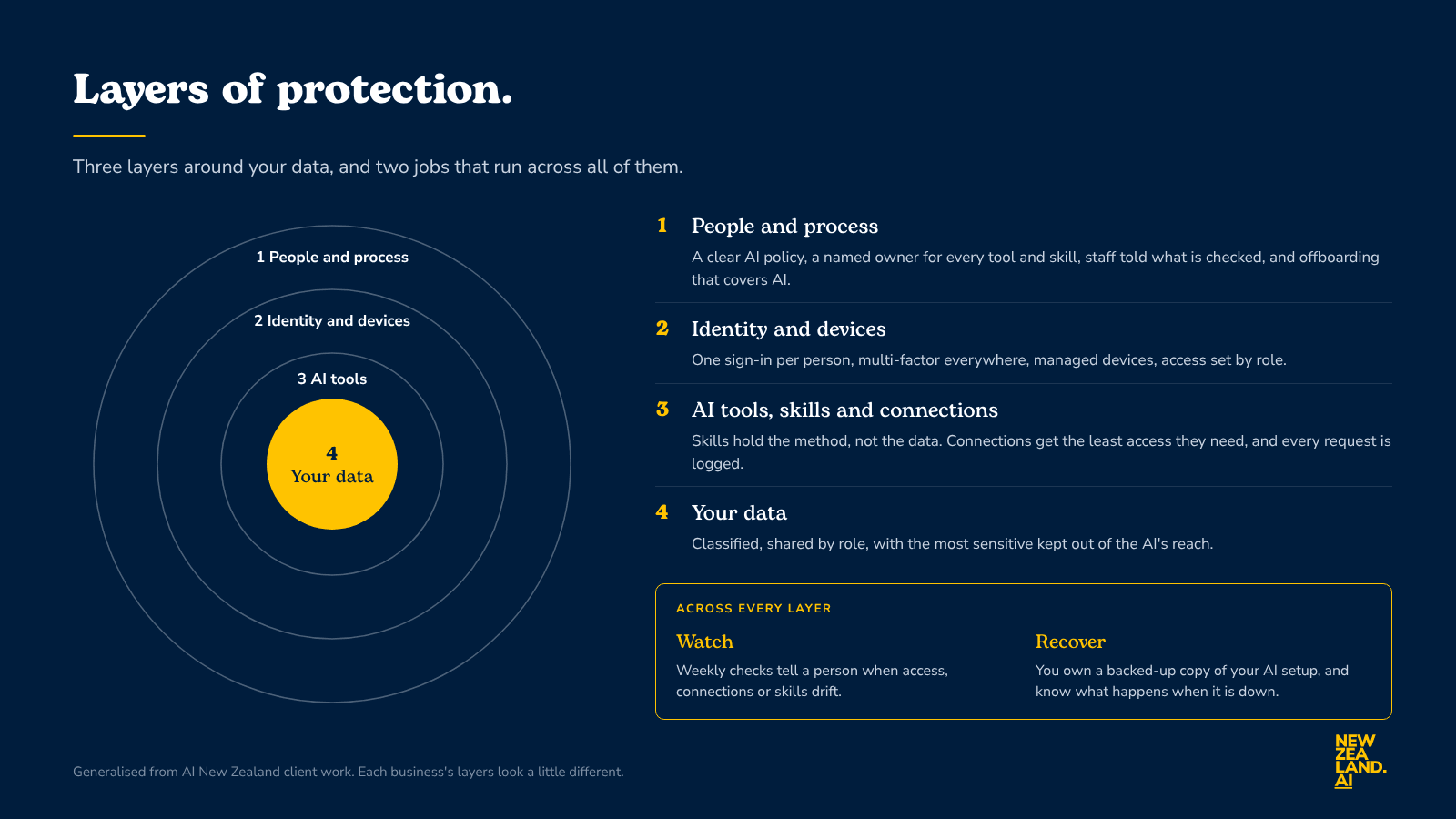
Layers of protection
In plain terms, the model has three layers around your data and two jobs that run across all of them:
- People and process: a clear AI policy, a named owner for every tool and skill, staff told what is checked, and offboarding that covers AI.
- Identity and devices: one sign-in per person, multi-factor everywhere, managed devices, and access set by role.
- AI tools, skills and connections: skills hold the method, not the data, and connections get the least access they need, with every request logged.
- Your data: classified and shared by role, with the most sensitive kept out of the AI's reach.
- Watch and recover, across every layer: regular checks that tell a person when access, connections or skills drift, and a backed-up copy of your AI setup that you own.
None of it is new, and that's deliberate. Layered defence is standard security practice, and the model lines up with the NIST Cybersecurity Framework that a lot of security work is built on. People and process is the governance, including knowing what AI you have and who owns it. The three inner layers do the protecting, watching is how you detect problems, and recovering is how you respond and get back up.
One caution about the rings, though. They suggest anything bad has to fight its way in from the outside, and with AI that isn't quite true. A connection can reach straight to the data, and a poisoned email can land right in the middle. That's why New Zealand's NCSC and its international partners push a never trust, always verify approach, and why watching and recovering run across every layer rather than sitting on the edge.
The watching is the newer part. It's a set of read-only checks that look at what the AI can reach, who has access, what has changed and whether leavers were properly offboarded. They don't act on their own, they tell a person when something has drifted. The recovering is the continuity basics: who owns what, where a copy of your setup lives, and what happens when the AI is down.
Your AI now knows a lot about how your business works. The job is making sure that knowledge stays with the business.
If any of these questions landed a little close to home, I'm happy to talk them through. Flick me a note at ben@newzealand.ai.
Frequently asked questions
- What is key-agent risk?
- Key-agent risk is key-person risk in a new place. When a business puts its know-how into an AI setup (skills, templates, connections to email, files and finance systems), that know-how can leave in three ways: a person takes it with them, the vendor changes or retires something or goes down, or the contractor who built it moves on holding the only working copy.
- Can you stop prompt injection?
- Not fully. In December 2025 the UK's National Cyber Security Centre said prompt injection may never be completely fixed and warned against vendors claiming to stop it. The practical response is to limit what the AI can reach, so a successful attack can't get far, and to notice when that reach changes.
- Are AI instructions or system prompts a security control?
- No. Telling an AI "don't share this" is a request, not a rule. OWASP says AI instructions shouldn't hold sensitive information or be relied on to decide who sees what. Skills should hold the method, not the data, and the data should stay behind the same access rules as everything else.
- What should an exit checklist cover for AI?
- As well as the laptop, phone and swipe card, it should cover AI tools on personal accounts (including AI note-takers), chat history, and any connection that lets a tool keep reading the person's mailbox or files after they've gone. It should also ask what AI work, accounts or notes the person owned, so someone else picks them up.
- What is Shadow AI and should we ban it?
- Shadow AI is staff using AI tools the business hasn't approved and can't see, usually on personal accounts. Banning it mostly pushes it further out of sight. What works is giving people approved tools that are good enough to use, being clear about what can and can't go into them, and making sure offboarding asks the question.
- How should a business plan for an AI outage?
- Know where AI does real work, decide what happens at 8am if the main tool is down for a day, and test the manual workaround. Keep a copy of your AI setup that the business owns, and expect skills tuned to one model to need maintaining when that model is retired.